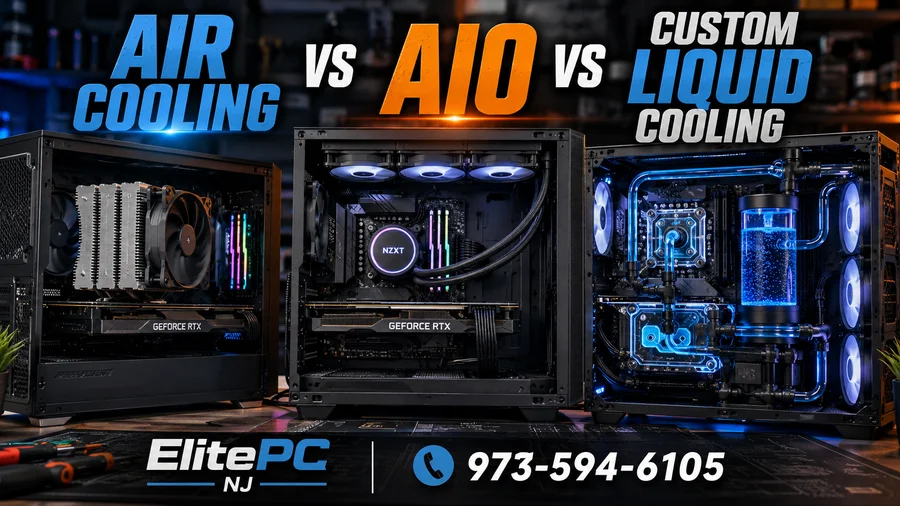
Choosing the right PC cooling system is not just about which cooler looks best through a glass side panel. The wrong cooling choice can lead to overheating, noise, thermal throttling, pump failure, leaks, expensive maintenance, or even damage to parts that cost far more than the cooler itself.
For many gaming PCs, the cooling system becomes an afterthought until something goes wrong. AIO liquid coolers can fail after years of use, custom loops need regular coolant service, and colored coolant can become a serious problem when maintenance is ignored. On the other hand, a quality air cooler may look less dramatic but can outlast multiple builds with minimal maintenance.
This guide breaks down the real-world pros, cons, maintenance needs, and failure risks of air cooling, AIO liquid cooling, and custom liquid cooling so you can choose the right option for your gaming PC, workstation, or everyday desktop.
Why PC Cooling Matters More Than Most People Realize
Every modern CPU and GPU is designed to protect itself from excessive heat. When temperatures rise too high, the processor reduces clock speed to bring heat under control. That behavior is called thermal throttling, and it can make a powerful computer feel slower than expected. Intel explains that throttling reduces processor clock speed when temperature exceeds the safe limit, helping protect the CPU from damage.
In practical terms, poor cooling can cause frame rate drops, stuttering, random shutdowns, loud fan noise, crashes under load, and reduced hardware lifespan. That is why professional overheating PC repair is not just about making a system quieter. It is about protecting expensive components and restoring stable performance.
Cooling choice also affects long-term ownership. A cooler that performs well on day one may not be the best choice if it requires maintenance the owner never plans to do. That is especially true for AIO liquid coolers and custom loops.
Air Cooling: The Reliable Workhorse
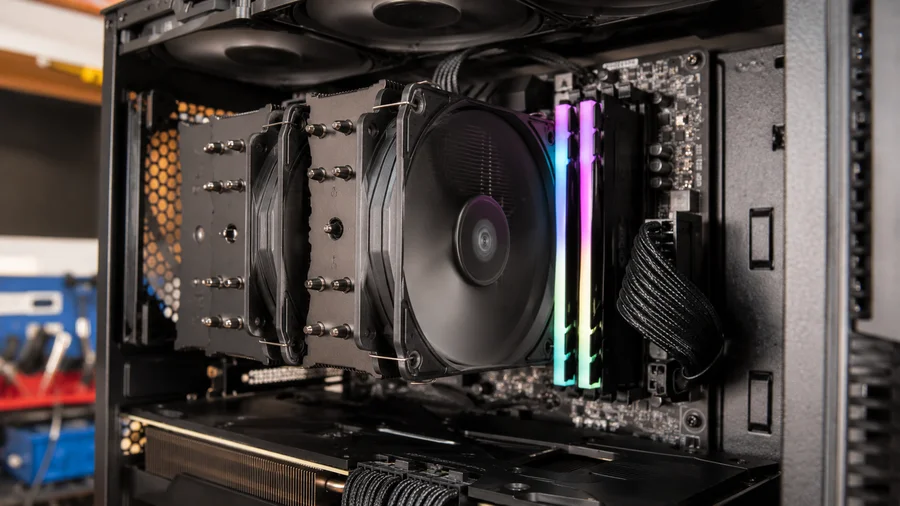
Air cooling is the simplest and often the most reliable cooling option. A typical tower air cooler uses a metal heatsink, heat pipes, and one or more fans to pull heat away from the CPU. There is no pump, no liquid, no tubing, and no coolant to break down over time.
For many users, that simplicity is the biggest advantage. A quality air cooler can last many years. If a fan eventually fails, the fan can usually be replaced without replacing the entire cooler. This makes air cooling an excellent choice for people who want performance without long-term maintenance concerns.
Pros of Air Cooling
- Very reliable long-term
- No pump failure risk
- No coolant leaks
- Lower maintenance than liquid cooling
- Usually less expensive than high-end liquid cooling
- Easy to troubleshoot and repair
Cons of Air Cooling
- Large tower coolers may block RAM clearance
- Can look bulky in showcase builds
- Performance depends heavily on case airflow
- May not match the aesthetics of high-end custom builds
For most home computers, business workstations, and many gaming PCs, air cooling is the safest long-term choice. It is especially smart for users who do not want to think about coolant maintenance, pump lifespan, or loop service. If a system is already overheating, a proper computer diagnostic service can confirm whether the cooler is undersized, clogged with dust, mounted incorrectly, or simply failing.
AIO Liquid Cooling: Great Performance, But Not Forever
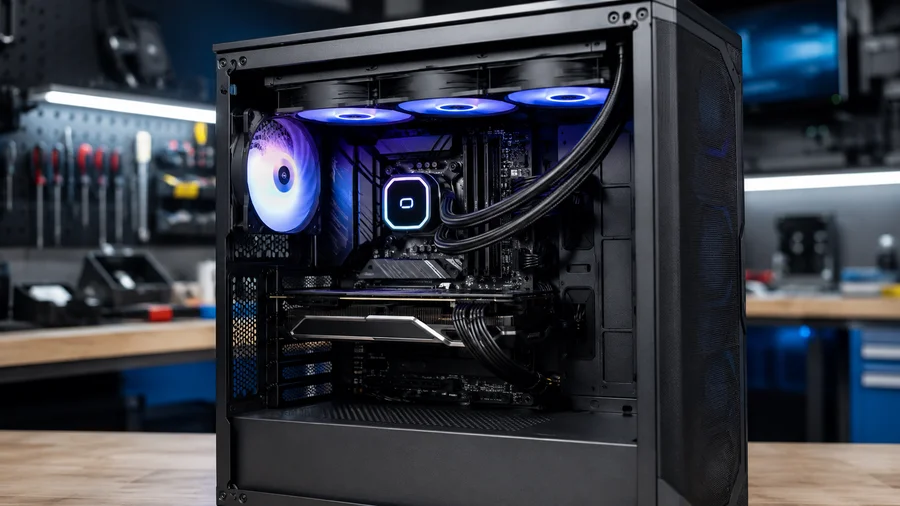
AIO stands for all-in-one liquid cooler. These coolers are factory sealed and combine a pump, radiator, tubing, coolant, and fans into a preassembled unit. They are popular because they look clean, perform well, and avoid the complexity of building a full custom loop.
A good AIO can be a great choice for gaming PCs, high-performance desktops, and builds where appearance matters. The radiator moves heat away from the CPU area, which can help keep the motherboard area cleaner and less crowded. Many AIOs also offer strong cooling for high-wattage CPUs.
The important thing most buyers do not realize is that sealed does not mean permanent. AIO coolers have pumps, seals, tubing, coolant, and internal channels that can degrade over time. Coolant can slowly permeate through tubing, pumps can fail, and internal blockages can reduce cooling performance. Once the pump fails or the loop becomes restricted, the entire AIO usually needs to be replaced.
Pros of AIO Liquid Cooling
- Clean appearance inside the case
- Strong cooling performance for many CPUs
- Good option for compact high-performance builds
- Less complex than custom liquid cooling
- Can reduce clutter around the CPU socket
Cons of AIO Liquid Cooling
- Pumps can fail
- Coolant can slowly evaporate or permeate over time
- Blockages can develop internally
- Leaks are uncommon but possible
- Most units are not realistically serviceable
- Replacement is usually required when the AIO fails
This is where many users get caught off guard. A system may run well for years, then suddenly begin overheating because the AIO pump is weak, noisy, blocked, or dead. When that happens, the computer may throttle heavily, shut down, or fail stability tests. ElitePC NJ frequently sees gaming PCs where the cooler was assumed to be fine simply because the fans were spinning, even though the pump was no longer moving coolant properly.
AIO leak issues are rare, but they are not impossible. In 2025, Tom’s Hardware reported that HYTE warned owners of a specific THICC Q80 Trio AIO model to uninstall it immediately after a coolant leakage defect was identified. That kind of case does not mean every AIO is unsafe, but it does show why liquid cooling should not be treated as risk-free forever.
If your system uses an older AIO and temperatures are rising, do not ignore it. A cooling inspection through computer overheating repair or gaming PC repair can determine whether the cooler is still healthy or needs replacement.
Custom Liquid Cooling: Amazing Looks, Serious Maintenance
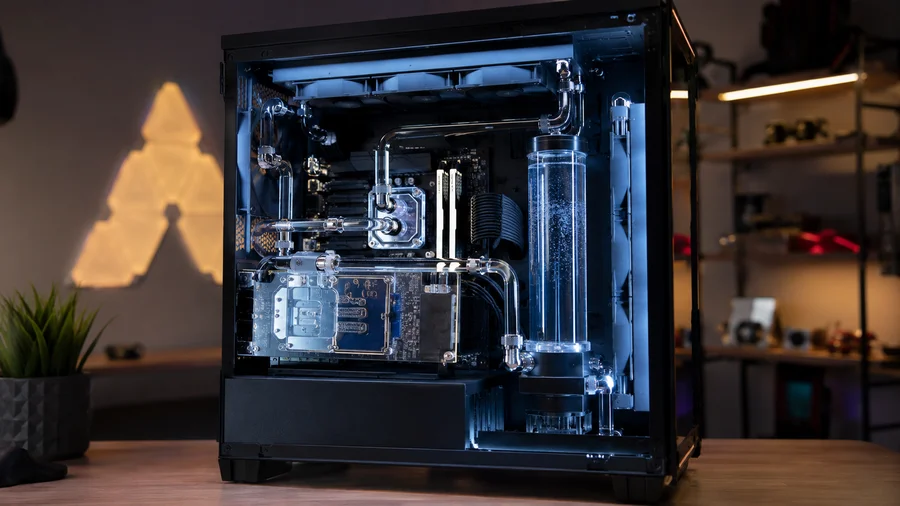
Custom liquid cooling is the premium enthusiast option. Instead of a sealed unit, a custom loop uses separate parts: pump, reservoir, tubing, fittings, radiators, coolant, CPU block, and often GPU blocks. A well-built custom loop can look incredible and provide excellent cooling for high-end systems.
For showcase gaming PCs, custom loops are hard to beat visually. They can cool both the CPU and GPU, reduce noise under load, and create a unique build that stands out. But they also come with a major requirement that many owners underestimate: maintenance.
Corsair recommends changing fluid in custom cooling systems every 12 months to remove particulate buildup and maintain thermal performance. Corsair’s own coolant guidance also notes that clear coolant generally lasts longer than colored coolant because colored fluids contain pigments or additives that can break down over time.
Pros of Custom Liquid Cooling
- Best visual presentation for showcase builds
- Can cool CPU and GPU in one loop
- Excellent thermal potential when designed correctly
- Can be quieter under heavy load
- Individual components can be serviced or replaced
Cons of Custom Liquid Cooling
- Requires regular maintenance
- Coolant must be monitored and changed
- Colored coolant can stain, separate, or clog components
- Leaks are possible if fittings, tubing, or seals fail
- Expensive to build and expensive to repair
- Poor maintenance can destroy the entire loop
The Biggest Mistake Custom Loop Owners Make
The biggest mistake custom loop owners make is treating a custom water-cooled PC like a maintenance-free appliance. It is not. A custom loop is more like a performance car: beautiful, powerful, and capable, but only if maintained properly.
When coolant is ignored for years, it can break down, leave residue, clog microfins inside water blocks, stain tubing, damage pumps, and create flow restrictions. Once blocks are clogged and pumps are contaminated, the repair can become expensive fast. In severe cases, the loop may not be worth saving.
This is especially true with colored, pastel, opaque, or show-style coolants. Those fluids may look amazing when the build is new, but they generally require more attention than clear coolant. Pigments and additives can separate, collect in blocks, or leave residue if the coolant is left in the system too long.
If a high-end custom gaming PC has not had coolant changed in several years, it should be inspected before it becomes a catastrophic failure. A professional evaluation through gaming PC repair can help determine whether the loop can be flushed, cleaned, rebuilt, or should be converted to a safer cooling setup.
Clear Coolant vs Colored Coolant
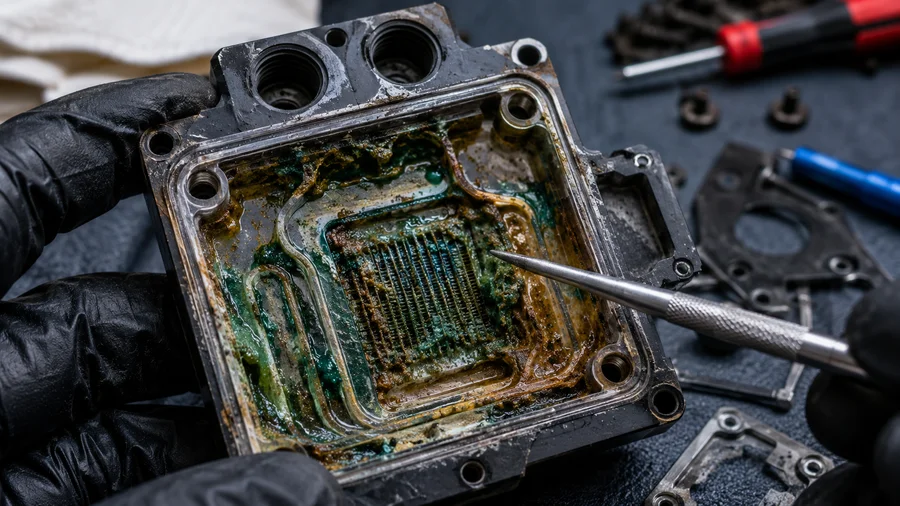
For long-term reliability, clear coolant is usually the safer option. It has fewer pigments and additives, which generally means less risk of separation, staining, and residue buildup. Colored coolant can still be used, but it should be treated as a higher-maintenance choice.
If appearance is the priority, colored coolant may be worth it for a show build. But if reliability is the priority, clear coolant with proper corrosion and biological protection is the more practical choice. This is especially important for customers who do not plan to service the system every year.
The worst approach is installing bright colored coolant and then ignoring it for five years. At that point, the loop may no longer be a cooling system — it may be a clogged, stained, contaminated repair bill waiting to happen.
Which Cooling Option Should You Choose?
There is no single best cooling option for every PC. The right choice depends on your system, budget, performance goals, and willingness to maintain it.
Choose Air Cooling If You Want Reliability
Air cooling is best for users who want a dependable system with minimal maintenance. It is ideal for most home PCs, business computers, and many gaming systems. If reliability matters more than aesthetics, air cooling is often the smartest choice.
Choose an AIO If You Want Clean Looks and Strong Performance
AIO liquid cooling is a good middle ground for gaming PCs and performance builds. It offers cleaner aesthetics and strong cooling without the complexity of a custom loop. Just understand that it has a limited service life and should be monitored as the system ages.
Choose Custom Liquid Cooling Only If You Will Maintain It
Custom liquid cooling is best for enthusiasts who understand the maintenance requirement. It can be beautiful and powerful, but it is not a set-it-and-forget-it solution. If coolant changes, inspections, and occasional rebuilds sound like a burden, a custom loop may not be the right choice.
Quick Comparison: Air Cooling vs AIO vs Custom Loop
- Lowest maintenance: Air cooling
- Best long-term reliability: Air cooling
- Best clean look without full custom work: AIO cooling
- Best showcase appearance: Custom liquid cooling
- Highest maintenance: Custom liquid cooling
- Highest risk if neglected: Custom liquid cooling
- Most practical choice for most users: Quality air cooler or AIO depending on build goals
If you are planning a new high-performance build, ElitePC NJ can help choose the right cooling system during a custom computer build. For existing systems that are overheating, noisy, or unstable, computer repair services can identify whether the cooling system is the real cause.
Frequently Asked Questions
How long does an AIO liquid cooler last?
Many AIO liquid coolers last several years, but they should not be expected to last forever. Pumps, seals, tubing, and coolant can all degrade over time. If temperatures rise, the pump becomes noisy, or the system starts shutting down under load, the AIO may be failing.
Is air cooling better than liquid cooling?
Air cooling is usually better for long-term reliability and low maintenance. Liquid cooling can offer cleaner looks and strong thermal performance, but it adds pumps, coolant, and more failure points. For many users, a quality air cooler is the smarter long-term choice.
How often should custom liquid cooling coolant be changed?
For most custom loops, coolant should be inspected regularly and generally changed every 12 to 24 months depending on the coolant type, system materials, and usage. Colored coolants may require closer monitoring because pigments and additives can separate or leave residue.
Is colored coolant bad for custom water cooling?
Colored coolant is not automatically bad, but it is less forgiving than clear coolant. Pigments and additives can break down over time, especially if the loop is neglected. If aesthetics matter, colored coolant can look great, but it should be maintained on a strict schedule.
Can a bad cooler damage a computer?
Yes. A failed pump, clogged loop, poor airflow, or overheating CPU can cause shutdowns, instability, and long-term stress on components. Modern systems have protection features, but repeated overheating should never be ignored.
What cooling option is best for a gaming PC?
For most gaming PCs, a high-quality air cooler or AIO liquid cooler is the best practical choice. Custom liquid cooling is best reserved for enthusiasts who want a showcase build and are willing to maintain it properly. The right choice depends on performance needs, case airflow, budget, and maintenance expectations.

Need Help Choosing or Repairing a PC Cooling System?
If your gaming PC is overheating, your AIO cooler may be failing, or your custom liquid loop has not been serviced in years, do not wait until more expensive hardware is damaged. Cooling problems can cause thermal throttling, shutdowns, crashes, and long-term component stress.
ElitePC NJ provides computer overheating diagnostics, gaming PC repair, custom computer builds, cooling upgrades, and maintenance services for customers in Garfield, Bergen County, Passaic County, and surrounding North Jersey areas.
Call 973-594-6105 or email service@elitepcnj.com to schedule service today.
External resources: Corsair custom cooling coolant maintenance guide, Corsair Hydro X custom cooling FAQ, Intel thermal throttling explanation, Tom’s Hardware AIO leak warning report.